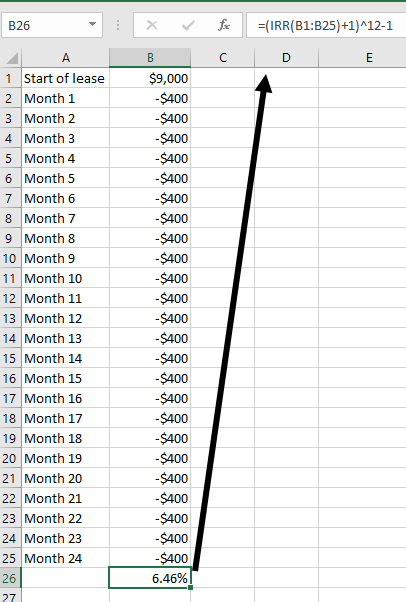
Step 2: Using the internal rate of return function to calculate a capital lease interest rate
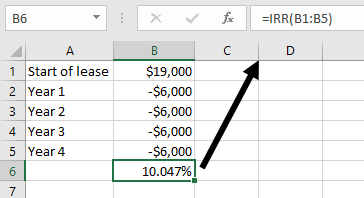
If the payments are made annually, the next step is straightforward. Use the =IRR() function in your spreadsheet to calculate the interest rate of the capital lease. Select the payment data you set up in step one, beginning with the amount financed and ending with the final payment amount. We’ll demonstrate with an example in the next section to clarify exactly what this looks like.
If the payments are paid monthly or quarterly, our formula is slightly different to adjust for the non-annual payment schedule. The internal rate of return calculation is by definition annual, so we just have to tweak the calculation a bit to account for that.
For a monthly payment schedule, use this formula: =(IRR()+1)^12-1.
For a quarterly payment schedule, use this formula: =(IRR()+1)^4-1.
Taking a closer look at each formula, you can see that we're inserting the number of payments per year in the exponent, effectively adjusting the internal rate of return calculation to work for each respective non-annual payment schedule. Here’s an example to clarify exactly what to do.